Legal Integration Guide
Consent screen requirements for partners integrating the AI Gateway Module
1. Introduction
To ensure a positive experience for your users and maintain a secure network, please adhere to the following legal requirements. Meeting them makes you eligible to use the AI Gateway Module to monetize your applications.
Please note that you are contractually obliged to integrate the end-user consent process described below into your application in order to use the AI Gateway Module.
Glossary
Module — the AI Gateway software module integrated into your application.
Partner — the entity (you) integrating the AI Gateway Module into an application.
End-user — the natural person using your application on their device.
Opt-in — the in-app control that allows the end-user to enable the Module.
Opt-out — the in-app control that allows the end-user to disable the Module at any time.
Need help during integration? Contact: [email protected]
2. Quickest Way to Start (≈ 30 minutes to compliance)
Follow this five-step checklist to reach compliance quickly. Each step is detailed in the sections that follow.
- Add the default consent screen (Section 3)
- Add the opt-out toggle in app settings (Section 4)
- Test the consent flow end-to-end (Section 5)
- Verify general legal compliance (Section 6)
- Submit your application for review (Section 7)
End-user consent journey
| 1. App launch | 2. Trigger point | 3. Consent screen | 4. User decision | 5. Module state | 6. Settings |
|---|---|---|---|---|---|
| User opens app | Value moment reached | Shown to user | Accept or Decline | Enabled / disabled | User can toggle anytime |
3. Default Consent Screen
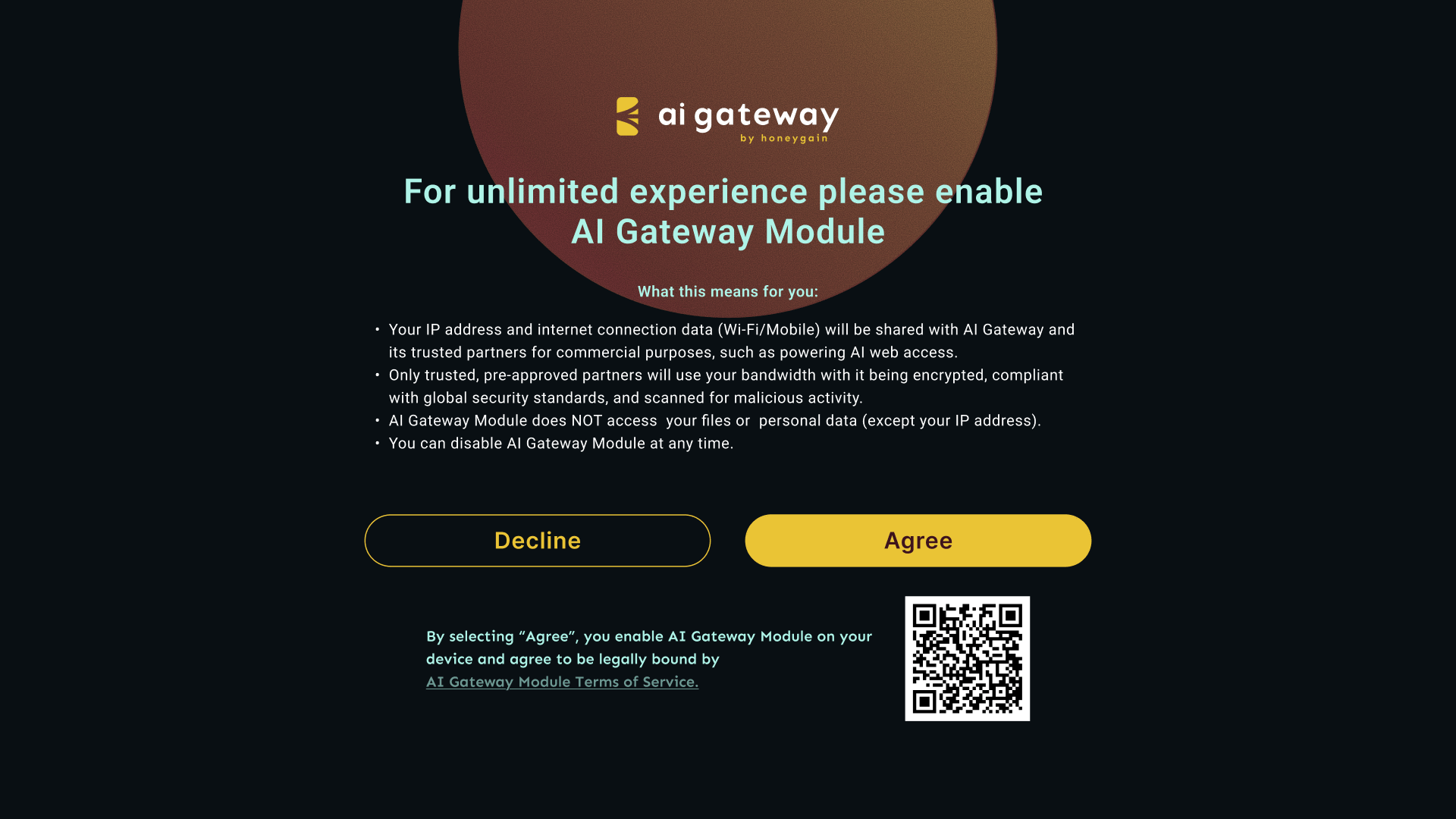
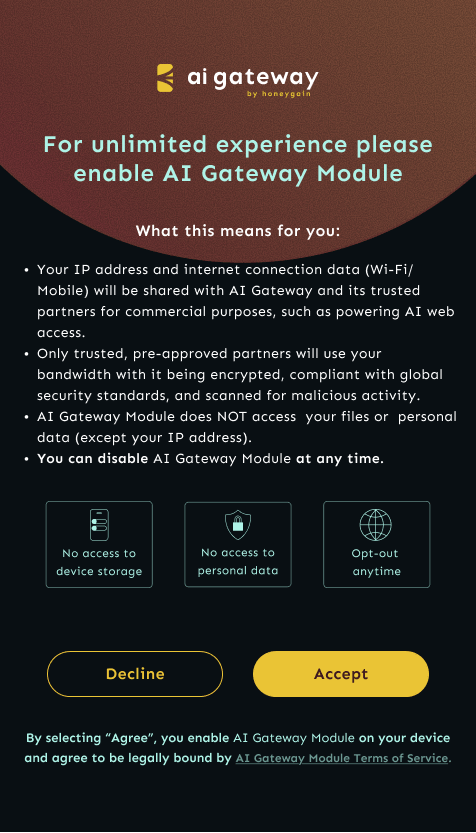
Each end-user must provide explicit consent before the AI Gateway Module is enabled. Use our pre-built template, built into the Module code, for instant compliance.
Default template wording
[APP TITLE] offers [DESCRIBE WHAT USER GAINS FOR ENABLING MODULE] in exchange for enabling AI Gateway Module on your device.
What this means for you:
- Your IP address and internet connection data (Wi-Fi/Mobile) will be shared with AI Gateway for commercial purposes, such as public web data collection.
- AI Gateway Module does NOT access your files or personal data (except your IP address).
- You can disable AI Gateway Module at any time.
By selecting “Agree”, you enable AI Gateway Module on your device and agree to be legally bound by the AI Gateway Module Terms of Service.
[ DECLINE ] [ AGREE ]
Terminology note — use one consistent word
Throughout your consent screen and settings, choose either “Agree” or “Accept” and use it consistently. Mixing both terms causes legal ambiguity and is a common reason for review rejection. This guide uses “Agree”.
Required elements (single source of truth)
| Element | Required wording / behavior |
|---|---|
| Exchange & benefit statement | Must clearly state what the end-user gains in return for enabling the Module. |
| Data usage disclosure | Must state: “Enabling AI Gateway Module will share your IP address and internet connection data with AI Gateway for commercial purposes such as public web data collection.” |
| Privacy assurance | Must state that no personal files or private data are accessed or collected (other than the end-user's IP address). |
| User control | Must state that the end-user can opt out at any time. |
| Meaning of “Agree” | Must include: “By selecting ‘Agree’, you enable AI Gateway Module on your device and agree to be legally bound by the AI Gateway Module Terms of Service.” |
| Legal link | A clickable link (or scannable QR code on TV platforms) to the AI Gateway Module Terms of Service: https://aigateway.honeygain.com/tos/ |
| Button label | Must contain the word “Agree” (consistently — see terminology note above). |
Default TV/Desktop consent screen example
Default Mobile consent screen example
4. Essential Opt-Out Control
End-users must have a simple and readily available way to disable AI Gateway Module functionality at any time.
Requirements
- Accessible option. Include a clear and easily located control within your application's settings to turn off the AI Gateway Module. Do not hide it using dark UX patterns or require users to take action outside the application.
- Simple toggle. The opt-out should be a straightforward control such as a single toggle switch and not a multi-step flow.
- Immediate effect. Disabling the toggle must immediately stop Module activity on the device.
- Persistent state. The user's choice must persist across app sessions and updates.
Example opt-out labels
- “Share internet connection for [your benefit]”
- “Use AI Gateway Module for [benefit]”
5. Testing Your Consent Flow
To ensure a single round of review and get your app monetizing as quickly as possible, please test your integration before submission.
5.1 Functional testing
- Consent screen appears at the intended trigger point
- “Agree” button properly enables AI Gateway Module
- “Decline” button properly rejects and continues app flow (unless the app is not usable without the Module, in which case the user should not get past the consent screen)
- Legal links open correctly (Terms of Service: https://aigateway.honeygain.com/tos/)
- Consent choice is properly stored and remembered
- Module only activates AFTER the user agrees (never before)
5.2 Opt-out testing
- Toggle switch appears in the settings menu
- Toggle accurately reflects current Module status
- Turning OFF immediately disables Module functionality
- Turning ON re-enables the Module (if previously consented)
- Turning ON displays the consent screen (if user has not consented previously)
- Settings persist across app sessions
- Clear visual indication of current status
5.3 Content validation
- All mandatory text elements are present
- Benefit description matches the actual user experience
- No misleading or exaggerated claims
- Legal links point to correct AI Gateway URLs
- Language translations (if applicable) are accurate
- No spelling or grammar errors in consent text
6. General Legal Compliance
In addition to the requirements above, your application and its integration of the AI Gateway Module must comply with the AI Gateway Partnership Terms of Service (the “Agreement”). Key areas of concern include:
- Proper informing and consent of end-users. Integrate the consent and acceptance mechanisms described in this guide.
- Age and capacity. Only enable the Module for end-users who have reached the age of majority (or other minimum age required to give valid consent) in their country. Where your application may be used by minors, implement appropriate age gating, and ensure that any minor only enables the Module with verifiable parental or legal-guardian consent, consistent with the AI Gateway Module Terms of Service and the AI Gateway Privacy Policy.
- Data privacy. Ensure compliance with all applicable data privacy regulations (e.g., GDPR, CCPA, and any other regulation applicable in your jurisdictions).
- Prohibited activities. Your application must not engage in any illegal or malicious activity while using the Module.
- Network integrity. Do not attempt to manipulate or interfere with the AI Gateway network.
7. App Submission and Approval
To submit your application for review:
- Go to your dashboard at https://aiportal.honeygain.com/dashboard/my-apps.
- Select your application and click the pen icon to edit.
- Open the App submission tab, fill out the form, and click Submit.
- Add in necessary app details and confirm the submission.
We test each application manually both before and after the AI Gateway Module is integrated to verify that it meets our requirements. We may block your application from the AI Gateway program and terminate your partnership agreement if we detect any illegal activity or other activities breaching the AI Gateway Partnership Agreement.
7.1 Review SLA
Typical manual review turnaround time is around 5 business days depending on team load.
7.2 Rejection & appeal
If your application is rejected, you will receive feedback identifying the issues to address. You may resubmit after corrections are made.
8. Consent Screen Customization
While we encourage you to use the built-in consent screen, alternative variations are possible. You must still ensure the consent screen complies with the AI Gateway Module legal requirements. Please follow the instructions below to avoid misconduct. Any customized consent screen must be coordinated with Honeygain and confirmed by Honeygain before it is used in production, as required under the AI Gateway Partnership Terms of Service. Submitting your application for review does not by itself constitute Honeygain’s confirmation of a customized consent screen.
Why this matters
It may be tempting to shorten or alter the consent screen as much as possible, but such attempts may result in a legally inadequate user consent process. That means your app will not get approved and you will not be able to monetize with the AI Gateway Module.
8.1 What you can customize
| Element | What you can change |
|---|---|
| Benefit description | Your specific value proposition. |
| App branding | Colors, fonts, and logo placement. |
| Button text | While maintaining the word “Agree” (see terminology note in Section 3). |
| Timing | When to show the consent screen - provided it is displayed to end-users before enabling the Module. |
| Visual layout | Match your app's design system. |
8.2 What must stay fixed
| Element | Required wording |
|---|---|
| Core functionality explanation | Must cite: “Enabling AI Gateway Module will share your IP address and internet connection data with AI Gateway for commercial purposes such as public web data collection.” |
| Privacy assurance | “No personal files/data accessed.” |
| Opt-out statement | “Disable anytime.” |
| Legal links | Working link directing to the AI Gateway Module Terms of Service. |
| Meaning of “Agree” | “By selecting ‘Agree’, you enable AI Gateway Module on your device and agree to be legally bound by the AI Gateway Module Terms of Service.” |
8.3 When to show the consent screen
Recommended high-conversion moments:
- After a positive user action — completed level, successful transaction.
- Value-aligned timing — when the user needs the benefit you are offering.
- Onboarding sequence — after the user understands your app's value.
8.4 Suggested custom value propositions
By default we offer this way of communicating your value proposition in exchange for the user enabling the AI Gateway Module:
Default
[APP TITLE] offers [DESCRIBE WHAT USER GAINS FOR ENABLING MODULE] in exchange for enabling AI Gateway Module on your device.
Other variations
1. Direct benefit exchange
- Enable AI Gateway Module to unlock [DESCRIBE BENEFITS].
- Get [DESCRIBE BENEFITS] by allowing AI Gateway Module to run on your device.
- Unlock [DESCRIBE BENEFITS] — simply enable AI Gateway Module on your device.
2. Value proposition focus
- Help us keep [APP TITLE] free while earning [DESCRIBE BENEFITS] by enabling AI Gateway Module.
- Support [APP TITLE] and gain [DESCRIBE BENEFITS] by activating AI Gateway Module.
- Enable AI Gateway Module to enjoy [DESCRIBE BENEFITS] and help us improve your experience.
3. User-centric approach
- Want [DESCRIBE BENEFITS]? Enable AI Gateway Module to unlock these features.
- Enjoy [DESCRIBE BENEFITS] in return for enabling AI Gateway Module on your device.
- Get more from [APP TITLE] — enable AI Gateway Module for [DESCRIBE BENEFITS].
4. Call-to-action style
- Ready for [DESCRIBE BENEFITS]? Enable AI Gateway Module now.
8.5 Example custom consent screens
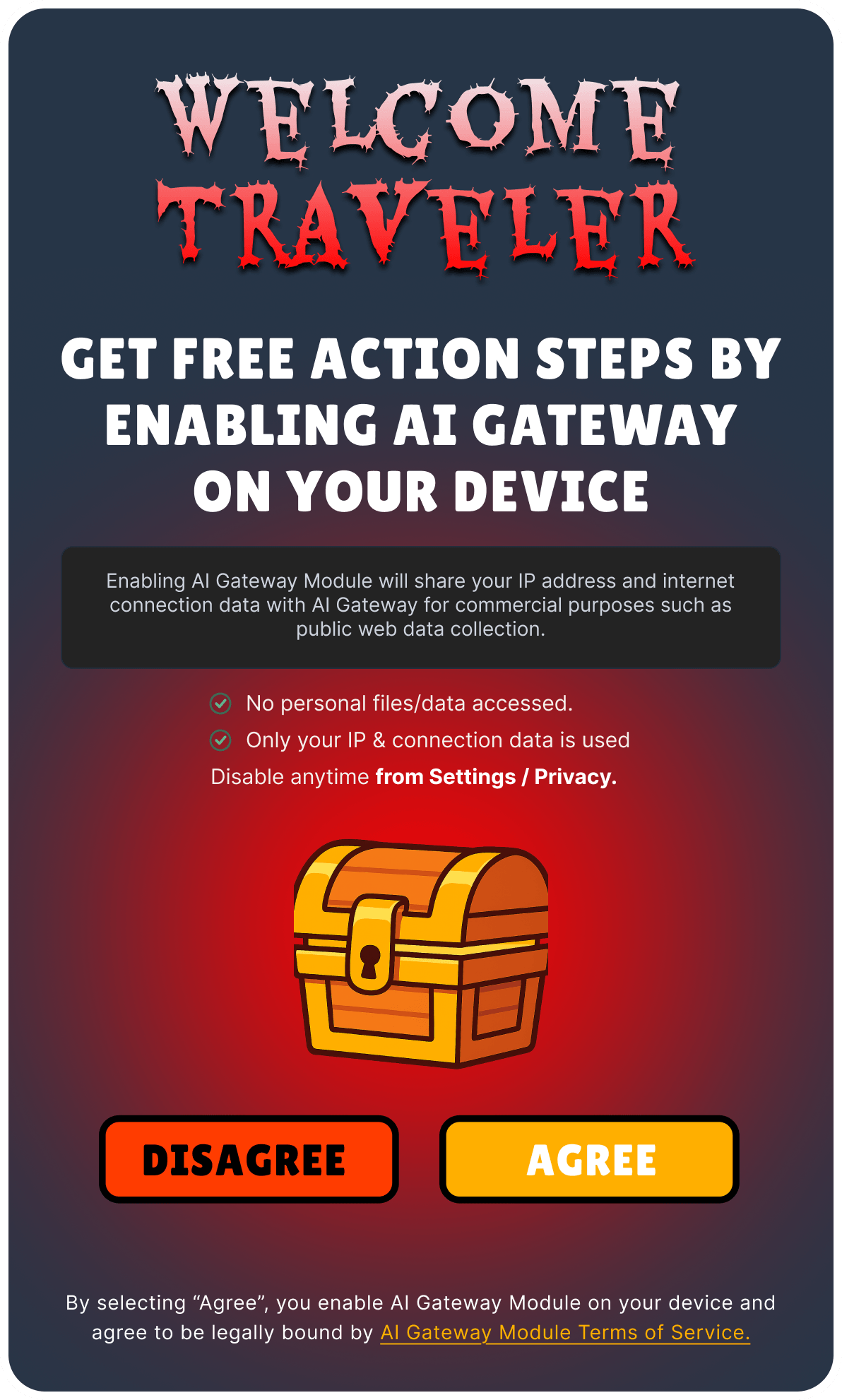 Example 1
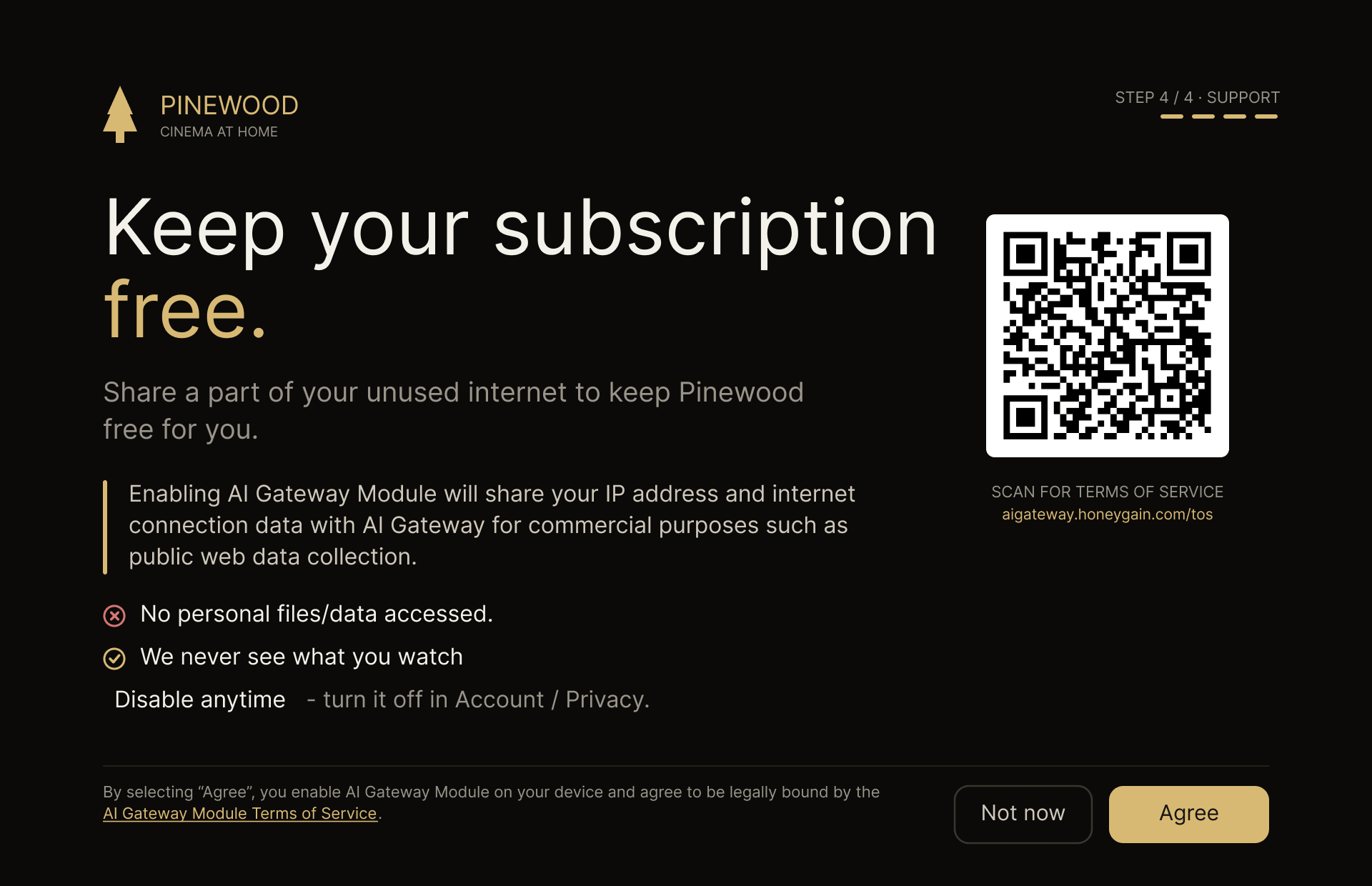 Example 2
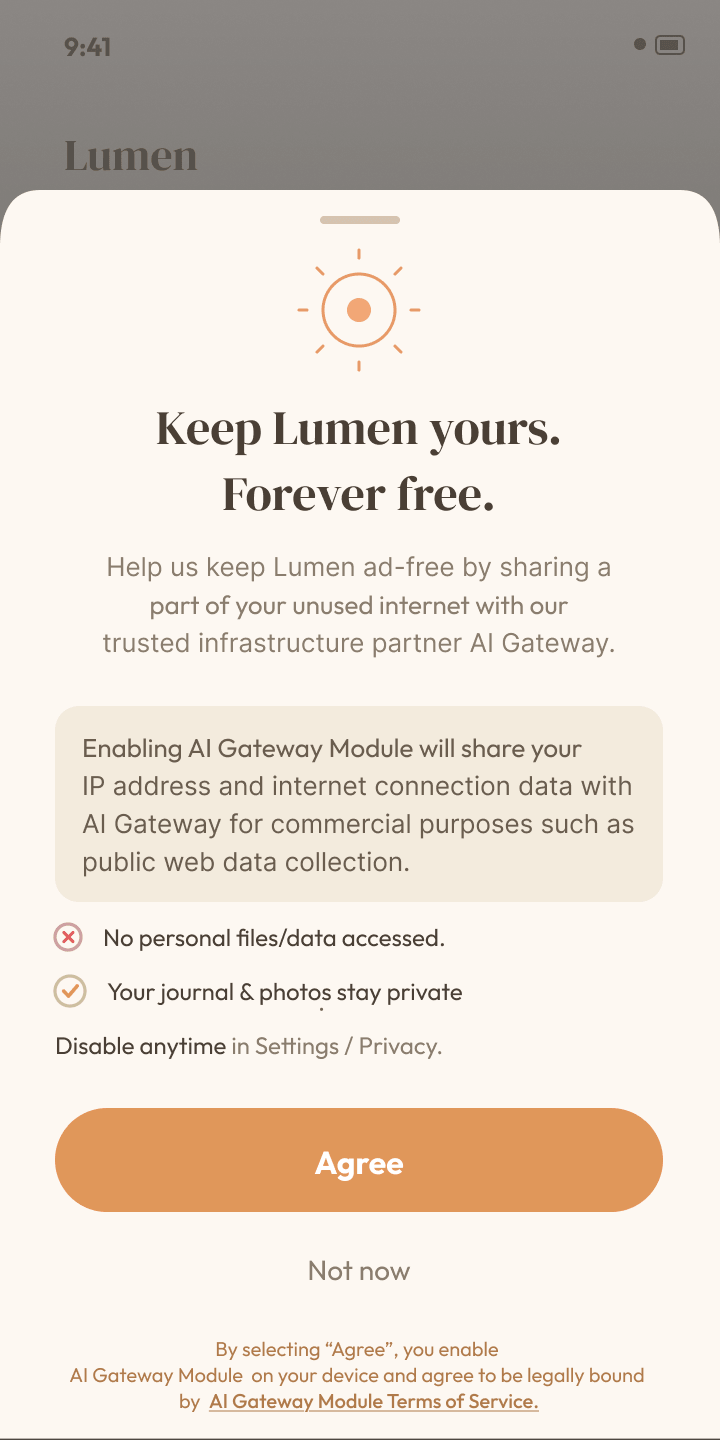 Example 3
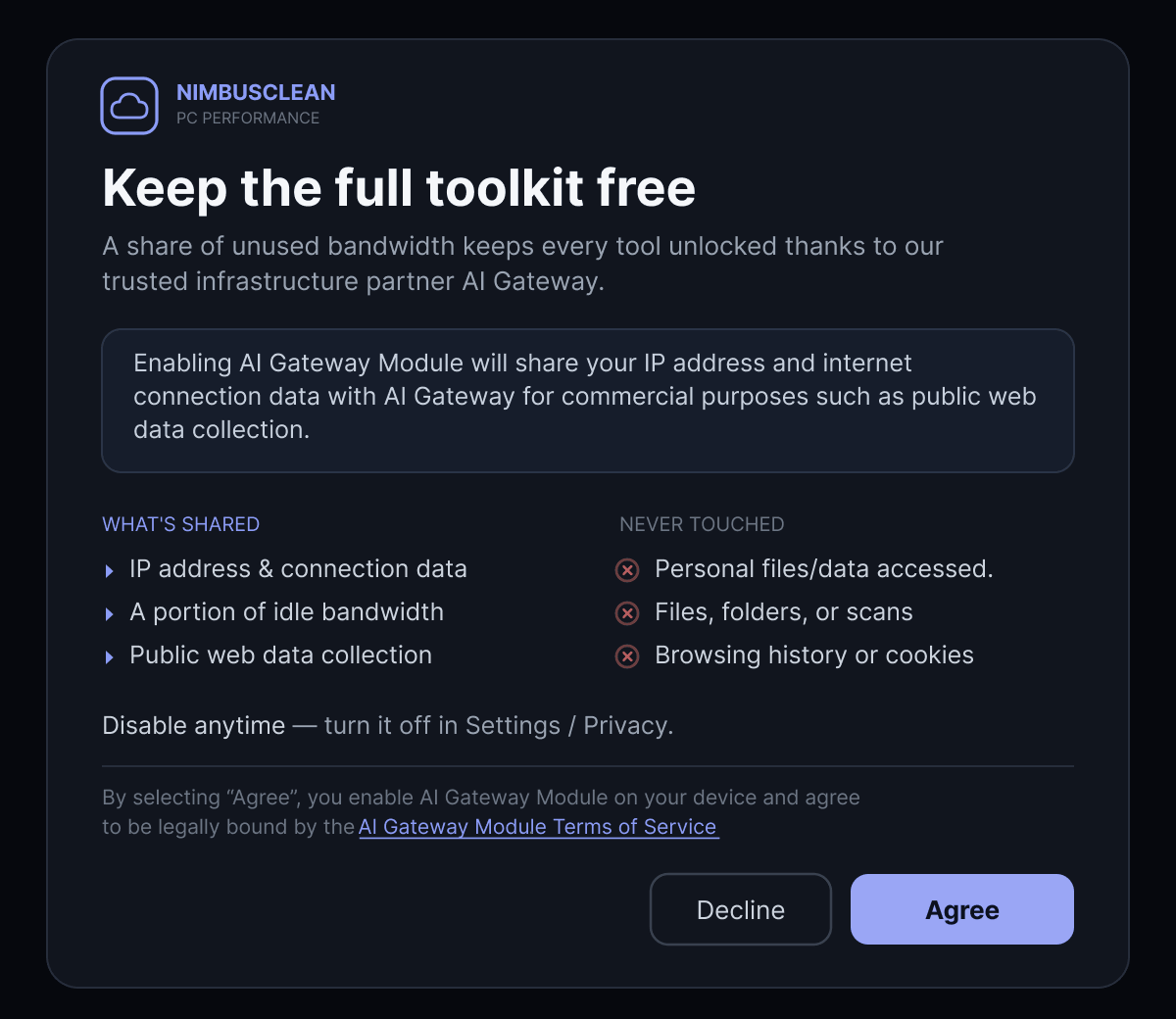 Example 4
9. Prohibited Practices
The following practices are considered dark UX patterns and will result in rejection or termination of your partnership:
- Pre-checked consent boxes or any UI that implies consent without an explicit user action.
- Hiding the opt-out behind multiple menu layers or in non-obvious locations.
- Re-prompting users who declined within short timeframes or repeatedly nagging them.
- Ambiguous button labels such as “Continue” or “OK” instead of the required “Agree”.
- Disabling app functionality as punishment for declining, unless the Module is genuinely core to the app's functionality.
- Misleading or exaggerated benefit claims not matched by actual user experience.
- Activating the Module before consent is granted, even partially or for testing in production.
10. Partner Sign-off Checklist
Use this one-page checklist as a final review before submitting your application.
Consent screen
- All required elements from Section 3 are present
- Button label is consistent (“Agree” used throughout)
- Legal link to AI Gateway Module ToS is working
- Wording matches required language for data usage, privacy, opt-out, and meaning of “Agree”
Opt-out
- Simple toggle present in app settings
- Toggle reflects current Module state and persists across sessions
- Turning off the toggle immediately stops Module activity
Testing
- Functional, opt-out, and content validation checklists completed
- Verified across all supported platforms / device classes
Legal & compliance
- Application complies with applicable data privacy regulations
- Age gating implemented where applicable
- Geographic restrictions respected
- Re-consent mechanism in place for material ToS changes